ffmpeg.wasm in 2026: what actually runs in a browser tab and what does not
published
TL;DR
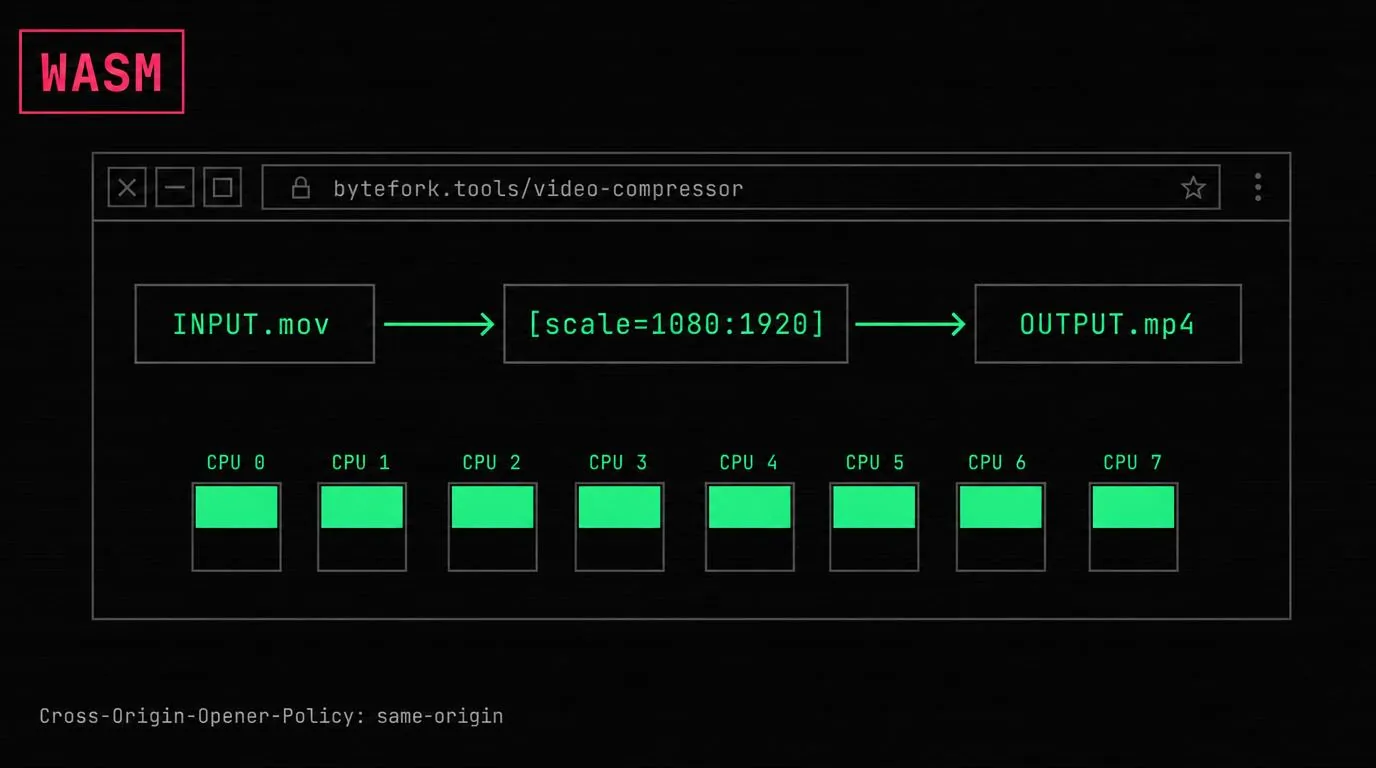
ffmpeg.wasm is a real port of the same ffmpeg binary you run from a terminal, recompiled to WebAssembly. It can trim, concatenate, compress, and re-encode video entirely in the browser. The trade-offs are size (the core ships as a multi-MB WASM bundle that loads on first use), speed (~3–10x slower than native ffmpeg on the same hardware), and a hard requirement for Cross-Origin-Opener-Policy + Cross-Origin-Embedder-Policy headers to enable multithreading. For privacy-first tools where the user’s clip never leaves the device, the trade is worth it.
Why a browser video tool at all
Every online video editor before WebAssembly worked the same way: upload your file to the vendor’s servers, let them transcode it, download the result. That model is fine when the input is a public asset, but a lot of video is not. iPhone footage carries GPS in EXIF. Screen recordings show whatever was on screen. Family clips are family clips. Sending them through an unknown pipeline for a 30-second trim is a poor trade.
ffmpeg.wasm changes the calculus. The same FFmpeg you’d apt install runs inside the browser tab, on the user’s CPU, with the file held in memory. The output never touches a server. The three video tools on this site — splitter & joiner, compressor, YouTube Shorts converter — are all the same WASM core driven by different filter graphs.
What you actually ship
The ffmpeg.wasm project maintains the build. A page that uses it pulls down two artifacts at runtime:
| Artifact | Purpose | Notes |
|---|---|---|
ffmpeg-core.js | JS glue + worker boilerplate | Small, loads first |
ffmpeg-core.wasm | The compiled FFmpeg binary | Multi-MB, lazy-loaded on first use |
The core is loaded from a CDN on first user action — not on page load. The marketing pages, blog posts, and tools that never touch video stay snappy. Only when someone clicks “compress” does the browser pay the WASM download cost. The cost is real but only paid once: subsequent operations reuse the in-memory core.
There is also a -mt (multithreaded) build, which is the one you want for real video work. It uses POSIX threads compiled to WebAssembly threads via SharedArrayBuffer. That last sentence is where most of the deployment friction comes from.
The COOP/COEP requirement
SharedArrayBuffer is gated behind cross-origin isolation. To get it, the page must serve two HTTP headers (MDN: cross-origin isolation):
Cross-Origin-Opener-Policy: same-origin
Cross-Origin-Embedder-Policy: require-corp
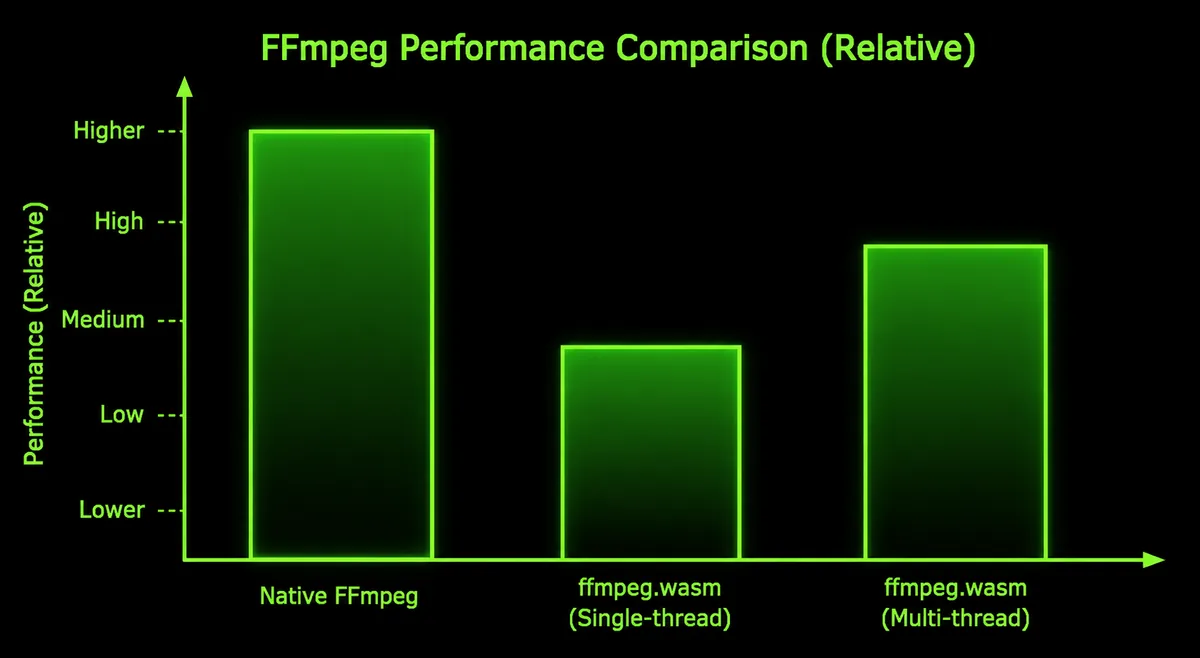
Without those, window.crossOriginIsolated is false, the multithreaded WASM build refuses to initialize, and you fall back to the single-threaded build — which is several times slower.
The catch: COEP: require-corp makes every cross-origin subresource (images, fonts, third-party scripts) require an explicit Cross-Origin-Resource-Policy opt-in. Embedding a YouTube iframe, loading a Google Font, or pulling an analytics beacon from a different origin will break unless the resource sets the right header.
Practical workarounds, in increasing order of operational cost:
- Scope the headers to the video routes only. Cloudflare Pages and most CDNs let you set headers per-path. Apply COOP/COEP only on the
/video-*routes, leave the rest of the site alone. - Use the
credentiallessvariant.Cross-Origin-Embedder-Policy: credentialless(instead ofrequire-corp) loosens the rules for cross-origin loads while still enablingSharedArrayBufferin most modern browsers. Browser support is good but not universal — check before relying. - Use a service worker to inject the headers. If you cannot control the response headers (static host, no header config), a service worker can intercept fetches and add COOP/COEP. The ffmpeg.wasm project’s documentation walks through this pattern.
- Ship the single-threaded build. Slower but no header gymnastics. Fine for short clips.
Performance, honestly
Browser ffmpeg is not as fast as desktop ffmpeg. The same encode that takes 20 seconds in a terminal takes one or several minutes in a tab. The reasons:
- WebAssembly overhead. Hand-tuned x86 SIMD assembly inside FFmpeg cannot be used. The WASM build uses portable C paths plus WebAssembly SIMD where available — fast, but not as fast as the native paths.
- Limited parallelism. Multithreaded WASM uses Web Workers under the hood. The thread model is real, but spinning workers and the cost of
SharedArrayBufferaccess add overhead native pthreads don’t pay. - No hardware acceleration. Desktop ffmpeg can offload H.264/HEVC encoding to GPU (NVENC, QuickSync, VideoToolbox). The WASM build is CPU-only.
- Memory model. The whole input file lives in the WASM heap. Large 4K clips can exhaust the default heap and require a manual heap size bump.
Rough order-of-magnitude on a 2024-era laptop: trimming a 60-second 1080p clip takes seconds. Re-encoding the same clip from HEVC to H.264 takes single-digit minutes. Compressing a 5-minute 4K clip takes tens of minutes — at which point you should question whether the user will wait.
Pragmatic rule: in-browser ffmpeg is right for clips under a couple of minutes at 1080p or lower. For longer, larger, or batch work, send people to desktop ffmpeg or a paid backend service.
What works well
- Trimming and concatenation. Stream-copy (
-c copy) avoids re-encoding entirely. A 10-minute clip can be trimmed in seconds because no pixels are touched. - Format conversion. MOV ↔ MP4, MKV → MP4, container rewrites without re-encoding.
- Aspect ratio remapping with re-encoding. 16:9 → 9:16 needs re-encode but is fast because the resolution drops.
- Audio extraction or replacement.
-vn(no video) or-an(no audio) operations are nearly free.
What does not
- AV1 encoding. libaom-av1 is slow even natively. In WASM it is impractically slow for anything beyond a few seconds.
- HDR tone-mapping. Possible but slow and rarely worth the complexity in a browser context.
- Long-form 4K. Memory and time both blow up. Cap at 1080p for anything multi-minute.
- Live streaming. ffmpeg.wasm runs offline encodes on a file in memory. It is not a live-pipeline tool.
- Anything needing hardware encoders. No NVENC, no QuickSync, no VideoToolbox. CPU-only.
What we run on this site
The three video tools share one ffmpeg-core instance per tab, loaded from a CDN on first use. The CSP allows wasm-unsafe-eval so the browser can compile the WASM module — unsafe-eval (which would re-enable JavaScript eval) is not needed and not granted. Each tool drives the core with a different filter graph:
- Trimmer/joiner.
-ssand-tofor trim points,concatdemuxer for joins. Mostly stream-copy. - Compressor.
libx264with-presetand-crfmapped to three quality buttons. AAC audio. - Shorts converter.
scale+padfor letterbox mode,crop+scalefor center-cut, always landing on exactly1080×1920.
The output is downloaded as a Blob via URL.createObjectURL. Nothing touches a server.
When to use ffmpeg.wasm and when not to
Pick the WASM path when: clips are short to medium, the user values privacy or works offline, and you do not want to operate transcoding infrastructure.
Pick a server pipeline when: clips are long or high-resolution, hardware acceleration matters, or you are doing high volumes where the per-clip CPU cost matters in aggregate.
Pick a desktop tool (Handbrake, ffmpeg CLI, DaVinci Resolve) when: the user is technical and the workflow is repeatable. Browser tools win on zero-install convenience, not on raw throughput.
References
- ffmpeg.wasm — project home, demos, build instructions
- ffmpeg — upstream project
- Cross-Origin Isolation — MDN
- Cross-Origin-Embedder-Policy — MDN
- WebAssembly threads — MDN, on
SharedArrayBufferusage - Video splitter & joiner, Video compressor, YouTube Shorts converter — the three tools on this site that drive ffmpeg.wasm